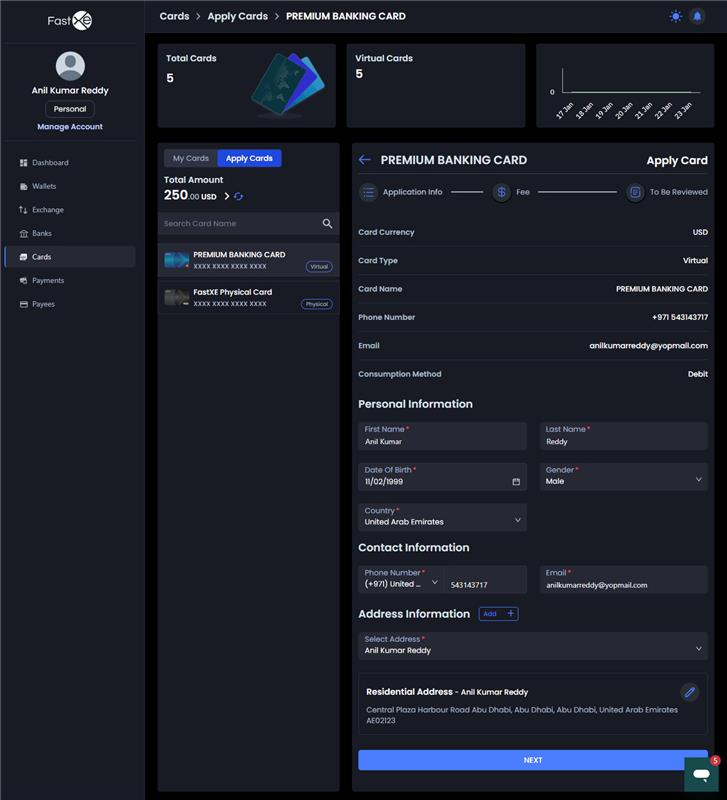
2. Virtual Card Application Process
The Virtual Card is applied for in the 'apply card' section.
2.1. Review Requirements and Charges:
-
Users must review the application rules and required information.
-
Review all card charges, including:
- Issuing fee.
- First recharge (minimum and maximum limits).
- Spend limit (per month).
- Card cancellation charge and maintenance charge (if applicable).
- Review time (time needed for card activation).
- Supported platform details.
2.2. Provide Personal Information:
- Provide the First Name, Last Name, and Middle Name (if any).
- Provide a Mail ID.
2.3. Select or Add Address:
- Select an available address (registered, mailing, or trading address) or add a new one.
2.4. Select Currency and Network:
- Select a stable currency (e.g., USDT), as stable currencies are supported by the card.
- Select the network (e.g., TRC20) where the balance is held.
2.5. Confirm Payment:
- Review the issuing fee, first recharge, and the total estimated amount required for payment.
2.6. Activation and Detail Access:
- The card will appear in the 'my card section' once applied.
- Card activation will take 10 minutes.
- After activation, the user gains access to the card numbers, CVP, and expiry date, along with the card holder name and card balance.