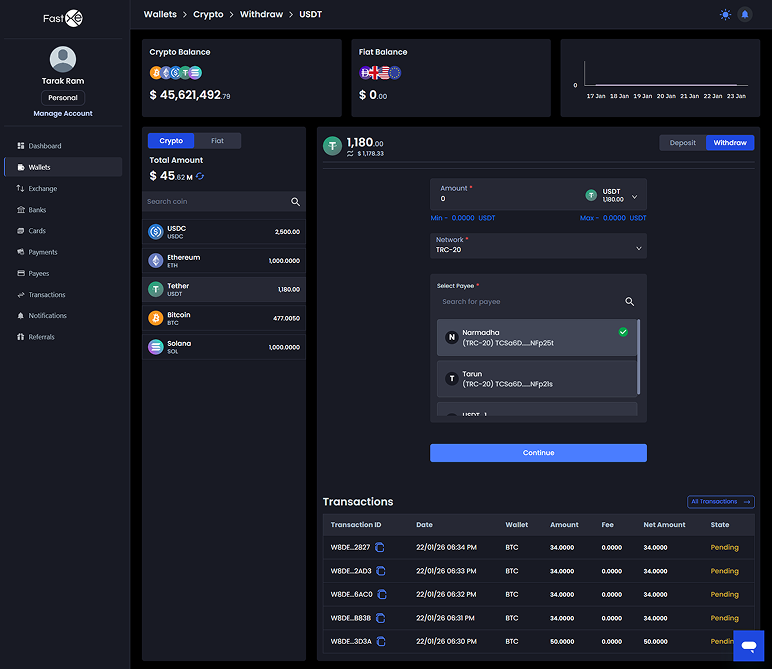
2.2 Crypto Withdraw
This process enables users to transfer cryptocurrency out of their wallet.
2.2.1. Select Currency/Network: Choose the currency or network (e.g., ERC or TRC) for withdrawal. Note that the available withdrawal amount will dynamically change based on the selected network.
2.2.2. Choose Payee: Select the recipient (payee) for the withdrawal from the available options and click "continue".
2.2.3. Review Transaction Details: The system will display critical transaction information, including the exchange rate, transaction fees, the net amount the receiver will get, and the receiver's address.
2.2.4. Phone Verification: A verification code will be sent to the user's registered phone number. This code must be entered and verified to proceed.
2.2.5. Confirm Withdrawal: After successful verification, click "withdraw". The transaction status will initially be pending.
2.2.6. Automatic Approval: The system automatically changes the transaction status to "approved" after 1 minute, and notifications are sent to the user without requiring any admin intervention.