Selling Cryptocurrency (Crypto to Fiat)
This guide details the step-by-step process for selling a supported cryptocurrency, such as USDT, to receive fiat currency in your account.
1. Initiate the Sell Order
The first step is initiated from the main Exchange screen.
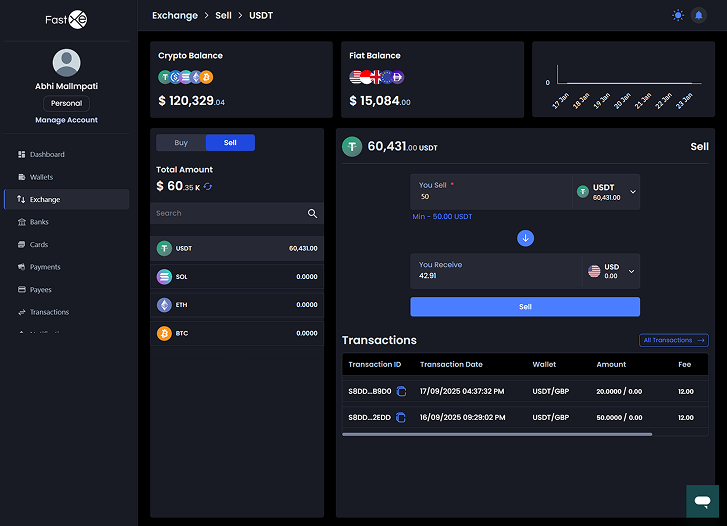
1.1 Inputting the Amount
- Ensure the Sell tab is selected.
- In the You Sell field, select the cryptocurrency you wish to sell.
- Enter the amount of crypto you want to sell.
Note: The minimum and maximum transaction limits are displayed for reference.
1.2 Viewing Payment Details
- The You Get field automatically calculates the equivalent amount of fiat currency you will receive, based on the current exchange rate.
- Click the Sell button to proceed to the summary screen.
2. Review Transaction Summary
After clicking Sell, the system displays a summary of the transaction for final confirmation.
2.1 Transaction Summary Details
The summary box displays the following key figures:
- Amount: The exact amount of crypto being sold.
- Fee: Any transaction fee applied to the order, shown in the fiat currency.
- You get: The total fiat amount that will be credited to your fiat balance.
2.2 Important Note
A cautionary note reminds the user:
Note: The output is an estimate and may vary due to market fluctuations and other factors.
2.3 Confirmation
- Review the details carefully.
- Click Confirm USDT Sell (or the respective crypto coin) to submit the order.
3. Transaction Confirmation and Status
Upon confirmation, the transaction is submitted for processing.
3.1 Success Message
A confirmation screen appears with a large success checkmark.
- A message confirms the order submission, indicating the amount sold and the next step: "Your sell order for [Amount] [Crypto] has been submitted and is now being processed. You will receive a final confirmation once the transaction is complete."
3.2 Transaction Log Update
- The transaction log at the bottom of the screen is immediately updated to include the new sell order.
- The initial Status for the associated transactions (the crypto debit and the fiat credit) will typically show as Pending until final processing is complete.
3.3 Next Action
- Click ← Sell Again to return to the main Exchange screen to initiate a new trade.